rigor-module-graph


Class/module/constant dependency graph for Ruby projects, built on Rigor. Surfaces the Ruby nominal graph — inheritance, include / prepend / extend, Rails associations, and (optionally) constant references inside method bodies — so the structural shape of an app/ is readable straight from the source.
For how this sits next to package-boundary tools and call graphs, see Why this design vs. the alternatives.
Two ways to look at the same graph. Static SVG via Graphviz for committing into PRs and docs; interactive HTML via Cytoscape.js for actually exploring a 1000+-node Rails codebase. Both rendered from the same edges.jsonl —no second analysis pass.
Cytoscape (--output html, the default)
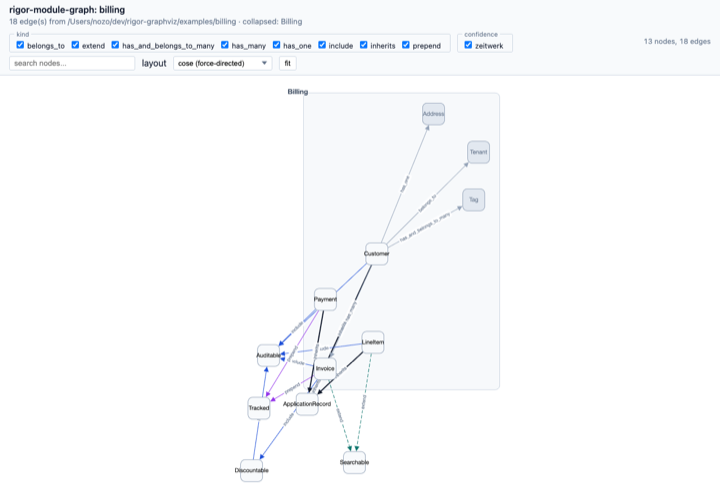 graph via Cytoscape
Graphviz (--output svg)
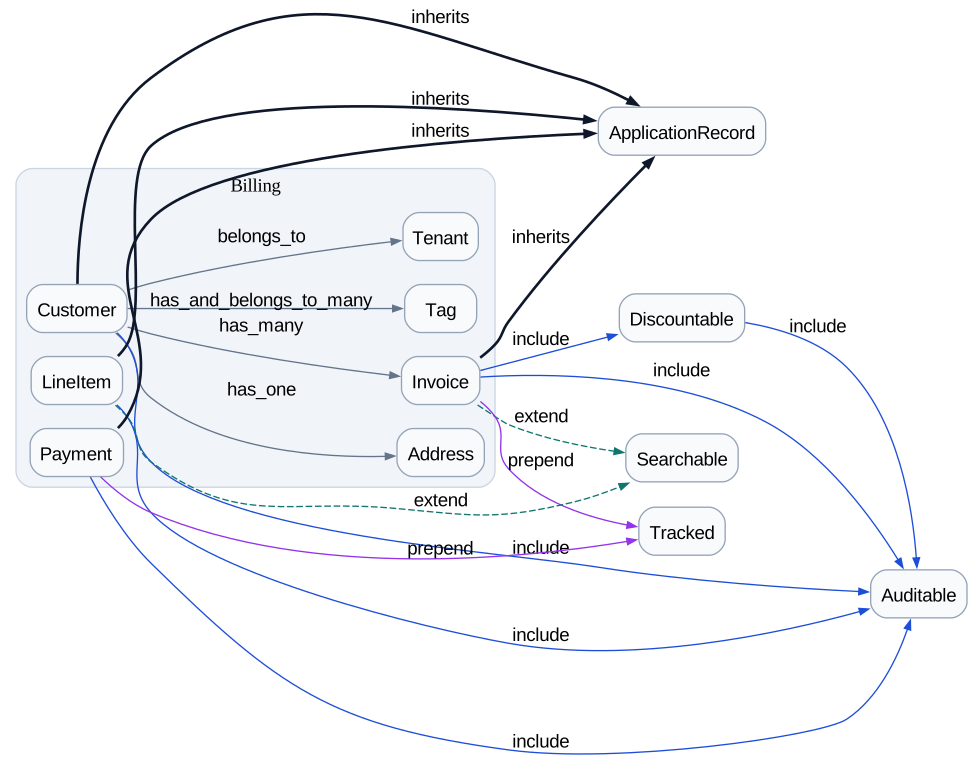 graph via Graphviz
Both screenshots are from examples/billing/. Open examples/billing/index.html directly to try the interactive version — pan, zoom, filter by kind / confidence, search by name, click a node to copy path:line.
Install
Via Bundler:
# Gemfile
gem "rigor-module-graph"
bundle install
Or system-wide:
gem install rigor-module-graph
Both paths pull in rigortype and rbs ~> 4.0 transitively. The rbs ~> 4.0 constraint is the one that matters: rigortype 0.2.x calls RBS::Environment::ClassEntry#each_decl, which only exists in rbs 4.x. The Ruby 4.0 stdlib bundles rbs 3.10 as a default gem, so installing rigor-module-graph (which depends on rbs 4.x) makes RubyGems activate the 4.x gem at run time and the analyzer stays alive.
For the full pipeline you also want graphviz installed so view --output svg and dot -Tsvg can render PNG / SVG from the generated DOT:
brew install graphviz       # macOS
apt-get install graphviz    # Debian / Ubuntu
A working dot on $PATH is optional — text / Mermaid / HTML output paths don’t need it. See How it works for the pipeline overview.
Getting started
The default subcommand analyses the current directory, writes a self-contained interactive HTML report (Cytoscape.js, vendored) under .rigor/module_graph/, and opens it in a browser:
cd path/to/your/project
bundle exec rigor-module-graph         # same as: rigor-module-graph view
A .rigor.yml must exist in the project root — that’s how rigor knows to load this plugin. The minimal version is two lines:
plugins:
  - gem: rigor-module-graph
That’s enough for view to run with all defaults. Everything else (paths:, autoload_paths:, …) goes in the Configuration section below, and every key defaults to a sensible Rails-shaped value.
Usage
view — one-shot HTML / SVG / Mermaid
The default html output is an interactive Cytoscape.js-based viewer: filter checkboxes for kind and confidence, live name search, fit button, and node-click → copy path:line to the clipboard. The Cytoscape library is vendored into the gem at a sha256-pinned version, so the generated HTML opens offline with no network round-trip.
# Don't open the browser (just write the HTML)
rigor-module-graph view --no-open

# Pick a different output format. `html` is the interactive
# viewer; `mermaid-html` is the legacy static-Mermaid embed
# (loads Mermaid from a CDN, kept for back-compat). Everything
# else streams to stdout unless `-o` is given.
rigor-module-graph view --no-open --output mermaid-html  > graph.html
rigor-module-graph view --no-open --output mermaid       > graph.mmd
rigor-module-graph view --no-open --output dot           > graph.dot
rigor-module-graph view --no-open --output svg           > graph.svg
rigor-module-graph view --no-open --output class-diagram > class.mmd
rigor-module-graph view --output svg -o graph.svg

# Click on a node opens the file in VSCode rather than copying
# path:line to the clipboard. `--path-mode none` strips the
# path metadata entirely — useful when sharing the HTML
# artefact outside the project.
rigor-module-graph view --open-with vscode
rigor-module-graph view --path-mode none      # share-safe
rigor-module-graph view --path-mode absolute  # cwd-resolved

# Focus on what's around one or a few constants
rigor-module-graph view --from Article --depth 5
rigor-module-graph view --from Article --depth 5 --direction out
rigor-module-graph view --from Billing::Invoice,Billing::Payment --depth 2

# Pick your own collapse list (default: auto-detect top-level
# namespaces with ≥ 3 members; applies to mermaid / dot / svg
# outputs — the interactive html viewer ignores it).
rigor-module-graph view --collapse Billing,Auth
rigor-module-graph view --no-collapse

# Same kind / confidence filters as the lower-level commands
rigor-module-graph view --kind inherits,include
rigor-module-graph view --confidence syntax,zeitwerk

# Cluster by Packwerk packages (auto-detects package.yml under cwd)
rigor-module-graph view --package
rigor-module-graph view --package-root /path/to/repo
--direction controls how the --from walk follows edges:
| direction | meaning |
|---|---|
out |
only “what does Article depend on” |
in |
only “what depends on Article” |
both |
both (default) |
--edge-scope controls which edges survive once the BFS finishes:
| edge-scope | meaning |
|---|---|
cluster |
keep every edge whose endpoints both fall in the reachable set (default — good for “show me the Article neighbourhood as a cluster”) |
walk |
keep only the edges the BFS actually traversed (good for “show me what depends on Article and nothing else”; drops sibling edges like Foo inherits ApplicationRecord that just happen to share a base class with reachable nodes) |
A 1-hop --from Article --direction out --edge-scope walk returns exactly the edges whose from is Article, never the sibling inherits ApplicationRecord of a reached node.
Lower-level pipeline
The pipeline view runs is also exposed as discrete subcommands when you want JSONL on disk or a pipeable text output:
# Run `rigor check` and write edges JSONL
# (default: .rigor/module_graph/edges.jsonl)
bundle exec rigor-module-graph collect

# Render the graph
bundle exec rigor-module-graph dot     .rigor/module_graph/edges.jsonl > graph.dot
bundle exec rigor-module-graph mermaid .rigor/module_graph/edges.jsonl > graph.mmd
dot -Tsvg graph.dot -o graph.svg

# Detect cycles (exit 1 if any are found)
bundle exec rigor-module-graph cycles  .rigor/module_graph/edges.jsonl

# Per-namespace fan-in / fan-out report
bundle exec rigor-module-graph stats   .rigor/module_graph/edges.jsonl
bundle exec rigor-module-graph stats --format json --limit 10 edges.jsonl

# UML class diagram (Mermaid classDiagram). Reads edges + the
# sibling nodes.jsonl that `collect` writes.
bundle exec rigor-module-graph class-diagram .rigor/module_graph/edges.jsonl > class.mmd
bundle exec rigor-module-graph class-diagram --no-private --no-attributes edges.jsonl
collect shells out to rigor check --format json --no-cache and filters diagnostics on source_family == "plugin.module-graph" + rule == "edge", so re-running is deterministic and there’s no on-disk side-effect from the plugin itself.
dot / mermaid / cycles accept a file argument or read stdin.
Filters and collapse
All reader subcommands accept the same filter flags. They prune the edge set before rendering / detecting; the JSONL on disk is untouched.
# Drop noisy const_ref / unresolved edges
bundle exec rigor-module-graph dot --kind inherits,include,prepend,extend edges.jsonl

# Only the edges we're sure about
bundle exec rigor-module-graph dot --confidence syntax,zeitwerk,rigor_type edges.jsonl

# Fold every Billing::* node into one cluster
# (Dot: subgraph_cluster_; Mermaid: subgraph)
bundle exec rigor-module-graph dot     --collapse Billing,Auth edges.jsonl
bundle exec rigor-module-graph mermaid --collapse Billing edges.jsonl

# Restrict the graph to the neighbourhood of one or a few
# constants (works on dot / mermaid / cycles too)
bundle exec rigor-module-graph dot     --from Article --depth 5 edges.jsonl
bundle exec rigor-module-graph mermaid --from Article --depth 5 --direction out edges.jsonl

# Cluster by Packwerk packages instead of by namespace
bundle exec rigor-module-graph dot     --package edges.jsonl  # cwd
bundle exec rigor-module-graph mermaid --package-root /path/to/repo edges.jsonl

# Cycles that stay within structural edges only
bundle exec rigor-module-graph cycles --kind inherits,include edges.jsonl
Configuration
.rigor.yml lives in the project root and is required —rigor reads it to discover this plugin. rigor init scaffolds a .rigor.dist.yml you can rename, or write it by hand. The two-line minimum from Getting started is enough; the full form below is for tuning.
target_ruby: '4.0'
paths:
  - app
  - lib
plugins:
  - gem: rigor-module-graph
    config:
      rails_zeitwerk: true
      autoload_paths:
        - app/models
        - app/controllers
        - app/services
        - app/jobs
        - lib
      concern_dirs:
        - app/models/concerns
        - app/controllers/concerns
      include_constant_refs: false
Every key shown is the default. Two switches worth knowing:
-
include_constant_refs: true— emitconst_refedges from bare constant references inside method bodies. Off by default because the volume of edges grows fast on a typical Rails app and the noise can drown the structural picture. -
rails_zeitwerk: false— keep every edge atconfidence: "syntax"and skip the path-based owner inference. Useful when the project doesn’t follow Zeitwerk’s autoload convention.
Compatibility
-
Ruby
>= 4.0.0, < 4.1 -
rigortype
~> 0.2.1 -
rbs
~> 4.0
Documentation
The public RDoc API is generated locally via rake rdoc, served on http://localhost:8808 via rake rdoc:server, and published to GitHub Pages on every push to main.
-
API reference (GitHub Pages) — built from
main, mirrors the current source. -
API reference (RubyGems) — the last released gem on rubydoc.info.
-
How it works — the static-analysis pipeline (Prism → node rules → confidence ladder → JSONL → renderers), and why this is a nominal dependency graph and not a call graph.
-
Security — supply-chain controls (Bundler cooldown, vendored-JS sha256 + 4-source audit, action SHA pinning, trusted publishing) and the layered pre-commit / CI gates that enforce them.
-
Known limitations — rough edges shipped with the current release (visibility tracker gaps, the bundled inflector, Mermaid 10.x quirks).
-
Development guide — local setup, git hooks, CI / Release workflows, test suite layout.
-
Design plan — the decisions still load-bearing for the code (edge model, confidence ladder, output channel, owner resolution, architecture map).
-
Changelog — per-version changes, formatted per Keep a Changelog with Semantic Versioning. The release workflow gates on a
## [VERSION]entry being present before pushing to RubyGems.